
One play. Both angles.
Switch views in the player and keep your preferred angle. Your other view stays available.
Goalie video for iPhone & iPad
Capture the play after it happens. Watch it from your seat. Review it with your goalie.

Free goalie stats.
Optional video subscription.
At the rink
An iPad or iPhone behind the net. Your phone in the stands. Tap Save after the stop and watch it seconds later.
Phone replays need Wi-Fi to the camera. Timing depends on your devices and connection.
Post-game review · New in 1.6
Each play together. Your best angle selected. A reel ready to share.
Switch views in the player and keep your preferred angle. Your other view stays available.
Rapid saves can share a video while every save still counts. Combine or split plays yourself.
Use the edited range, whole clip or key moment. Reorder the plays and save your reel by name.
Adjust where a play starts and ends without replacing its source clip.
Explore post-game tools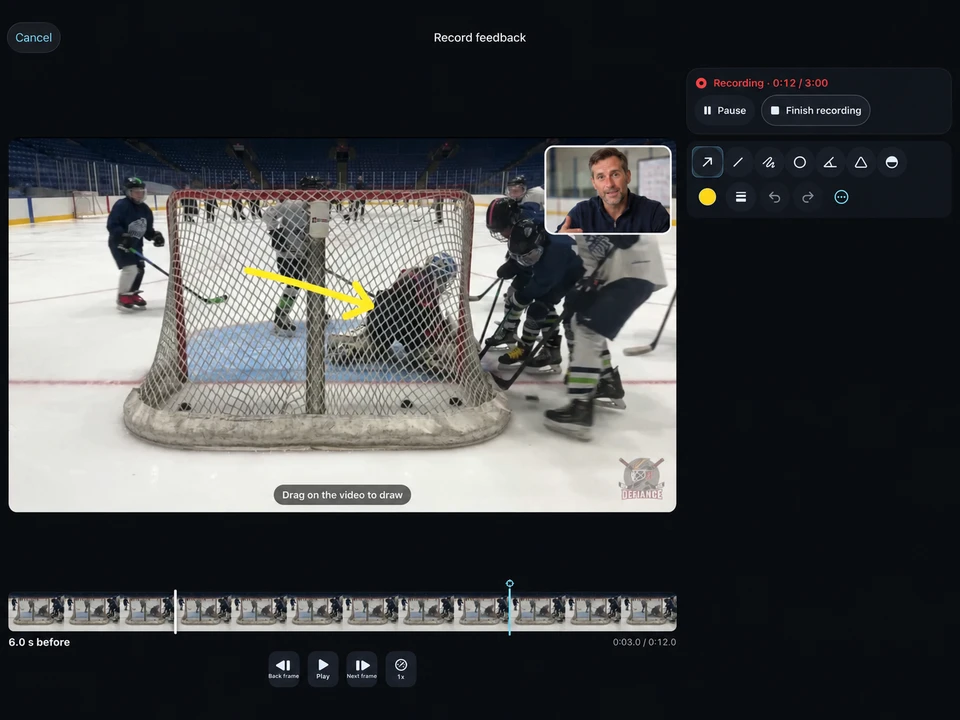
For the next practice
Slow it down. Step through frames. Compare two clips side by side, or draw on the video while you explain an adjustment.
Share drawings and voice-over. Keep notes, shot locations and coaching tags with each play.
See the coaching toolsOne app, from game day to review
Goalie stats are free. Track saves and goals, follow season trends and share game cards—no camera or account needed.
Explore free stats$49.99/year
Or $7.99/month · US pricing in USD
Two-week trial for eligible yearly subscribers.
Capture, remote replay, coaching and reels. Includes iPhone, iPad, Apple Watch and Family Sharing.
Recording requires a subscription. Local prices and trial eligibility appear in the App Store. Subscriptions renew until canceled in Apple settings. Coaches outside your Apple family group need their own recording subscription. Available in the US and Canada.
A supported iPad or iPhone, a secure mount, and enough charge and storage. Add a paired iPhone to save and replay from your seat. Keep CreaseCam open on the camera while recording. Read the setup guide.
No. Nearby controls can use Bluetooth or Wi-Fi; replays need Wi-Fi to the camera. Guided Enhanced Wi-Fi setup is available on supported devices. Check the connection from your seat before the game.
Saved plays include the lead-up. In 1.6, the initial review range starts six seconds before your tap and ends three seconds after, with adjustable defaults. Widen it within the retained footage. Missed it? can recover a play from up to ten minutes of footage still available on the camera.
Existing local clips remain available to view and export. An active video subscription is required to record new footage. Temporary sharing links are not a backup.